You can have an analysis that tells you exactly who your best customers are, and it changes nothing in the ad account until you turn it into a list you target or exclude.
And a list built from your own order data isn't the same thing as one a platform builds from browsing inside itself.
A platform audience knows what someone did inside that platform. Your store knows what they actually did: bought, spent a certain amount, came back or didn't, and which channel brought them the first time.
The difference shows up in the conditions you can write:
| The pixel can express | Your order data can express |
|---|
| Viewed a product page | Bought and spent above a threshold |
| Added to cart | Bought twice within 90 days |
| Visited in the last 30 days | Was first acquired through Snapchat |
| Nothing equivalent | Hasn't bought since a given date |
"Bought in the last 30 days, worth more than 1,000 SAR, first came in through Snapchat" isn't a condition a pixel can express. It's an ordinary query against your orders table.
One thing has to be in place first: identity resolution. A customer who arrived on their phone and bought on a laptop needs to count once. Duplication hurts most in exclusion lists, because you keep paying to reach someone who has already bought.
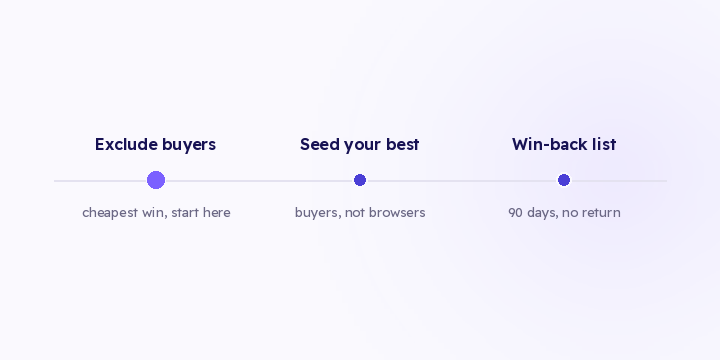
The cheapest win, and the one most stores forget. Every day a buyer stays inside your retargeting audience, you're paying to reach someone who is past the purchase.
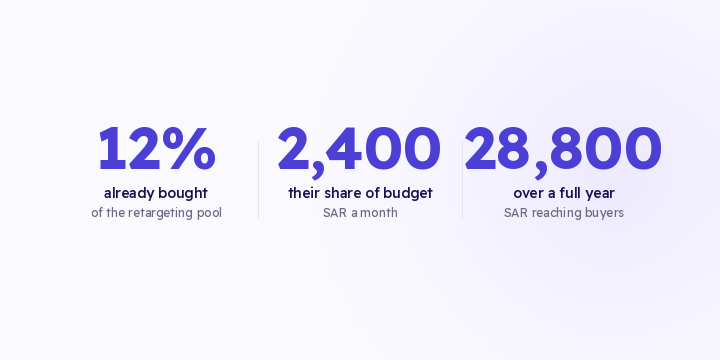
The arithmetic is simple. A retargeting budget of 20,000 SAR a month against an audience of 50,000 people. If 6,000 of them buy during the month, that's 12%, so their share of the budget is 2,400 SAR a month and 28,800 SAR over a year.
That amount never shows up as a loss in any report. It reads as normal spend on a campaign with a great ROAS.
A lookalike is only as good as the seed under it. "Everyone who added to cart" is a wide, weak seed, because most of those people never reached checkout.
Instead, take your top segment by spend or by repeat order count. A narrow seed of real buyers does better than a wide seed of all visitors.
There's a floor you can't go under: every platform needs a minimum list size to build on. If "top 10% by spend" comes out smaller than that, widen it to the top 20% rather than mixing in visitors who never bought. Widening the buyer segment costs you less than adding non-buyers.
Bought once, more than 90 days ago, hasn't come back.
This list only exists if identity is resolved. Without that, the same person shows up as three profiles and none of them looks lapsed.
Set the window on your own purchase cycle rather than a generic number. For a product people buy monthly, 60 days of silence is a clear signal. For a product bought twice a year, the same 60 days means nothing.
You export the audience, upload it, and forget it. Six weeks later three things have happened in parallel:
- People in the "hasn't bought" list have bought, and you're still paying to reach them
- New people now match the condition and aren't in the list
- The exclusion list has stopped excluding anyone
A manual export gets you the same result, but you have to redo it every time. Most steps that repeat by hand get done once or twice and then forgotten.
On every export, match data is hashed before it leaves your store, so what you upload isn't a readable list of emails.
In Flowfy, building the list from your customer data and exporting it works today. You set the conditions and get the member count back before you save, so you know the size while you're building rather than after you upload.
Daily automatic sync to the ad platforms hasn't shipped. Until it does, the practical routine is a scheduled manual export. The export is a query rather than a saved snapshot, so re-running it returns current membership. See the getting started guide for the line between what's live and what's planned.
Start with the exclusion list. It's the fastest one to build, and its effect shows up in retargeting cost within two weeks.
Then put a fixed slot in the calendar every two weeks to re-run the export, so the lists don't go stale on you.