What to freeze before a season, and what to keep changing
Most season damage comes from a change made during the season itself. Here are the parts you stop touching two weeks out, and the parts you keep adjusting every day.
Seasons rarely break because something was wrong to begin with. They break because something changed: a theme, a template, a tag, a destination. And the change lands at the one time of year when nobody has spare capacity to notice.
So the useful pre-season list isn't a list of things to verify. It's a list of things to stop touching.
The theme and checkout templates. Browser events live inside the theme. A seasonal redesign of a product page or a new landing template can drop add-to-cart and checkout events, and nothing errors. If a seasonal design is unavoidable, ship it four weeks out, not four days.
Tracking configuration. Destinations, event mapping, credentials. Each one of these fails silently. Changing them in the final fortnight is how stores create the problem the preparation was meant to avoid.
The attribution model. Whatever model you read the year in, read the season in the same one. Switch mid-season and the before and after stop being comparable, and someone will probably compare them anyway.
The comparison baseline. Decide before the season starts which comparison you'll judge by: the same season last year, aligned by season day. Leave the decision until you're inside the season and you'll pick whichever comparison flatters the result.
Budget allocation. Daily, sometimes twice daily. This is the whole point of measuring during a season.
Creative. Fatigue arrives faster in a season because frequency climbs. Rotating creative doesn't touch measurement.
Offers and bundles. Commercial decisions with no measurement dependency, provided you don't rename or re-create the products themselves mid-season, since a new product ID breaks catalogue matching.
Audience exclusions. Adding buyers to an exclusion list mid-season is one of the cheapest wins available, because retargeting waste peaks exactly when volume does.
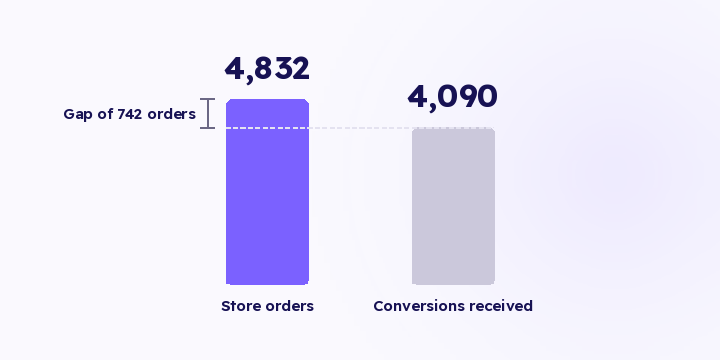
What separates the two lists isn't the size of the change or who makes it. It's that mistakes in the second list show up in your reports the same day, while mistakes in the first list only show up when you compare orders against recorded conversions, and most stores don't run that comparison until the season is over.
Once the freeze is in place, the operational routine is small:
Revenue by source today: is any channel drifting below break-even?
Delivered conversions per destination: has any destination gone quiet since yesterday?
That's it. Everything else waits for the readout. Make the daily routine longer than that and you'll probably stop running it after three days.
If you find a destination has gone quiet, don't cut the channel behind it. A channel whose event delivery stopped looks identical in the report to a channel that stopped working, except the first takes ten minutes to fix and the second needs a budget decision.
Credential validation, the live events view, the delivered log and revenue by source are live in Flowfy today and cover both checks. Joining ad spend from the ad accounts, so the daily check reads return rather than revenue alone, is on the roadmap and hasn't shipped, so for now you pull the spend figure from your ad accounts alongside it. Automated detectors that would replace the manual check haven't shipped either, and they're covered in tracking health.
Decide before the season who is allowed to change what, and who opens the two-minute check each day.
The common failure isn't that nobody knows how. It's that three people each assume one of the others is watching. In an ordinary month that costs you a day. In a four-day season it costs you the season.
Unfreeze in order: theme changes first, tracking configuration last, and not in the same week. If something breaks afterwards, you want to know which of the two caused it.
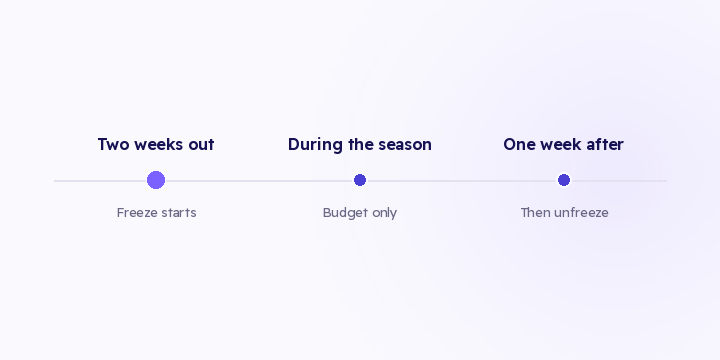
The freeze runs from two weeks before the season to one week after. The week after matters because that's when the readout is produced, and you want it produced on the same setup the season ran on.
For a short season like Eid this gets more important, not less. The shorter the window, the less time you have to notice and correct.
Write a two-line list two weeks out: what you froze, and who opens the daily check. And if you have to change the theme mid-season, run a full test purchase immediately afterwards, before the spend continues.
Tracking rarely fails in a way you can see. A theme update or a lapsed permission, and the numbers drift down and read as a slow week. Here's what to compare, how often, and how to tell when a gap is worth acting on.
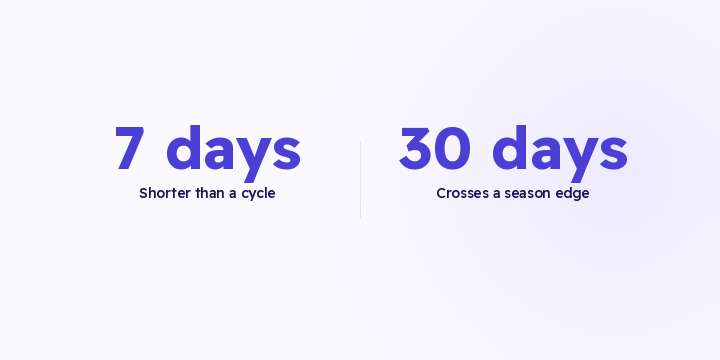
Last 7 days, last 30 days, this month. All three were chosen for convenience, not for a question. Here's how to pick the range from the question you actually have.
Every tool defaults to previous period. That default answers a different question than the one in your head. Here are the three comparisons, and which one judges performance.