

Tracking
Six ways tracking breaks, and how to check each one
Tracking doesn't fail in unlimited ways. It fails in about six, and each one has a fingerprint. Here are the six, and the check to run if you only have time for one.
3 min read
On Tuesday a theme update went out. The thank-you page was rebuilt and the script that lived on it went with it. No error appeared anywhere anyone looks.
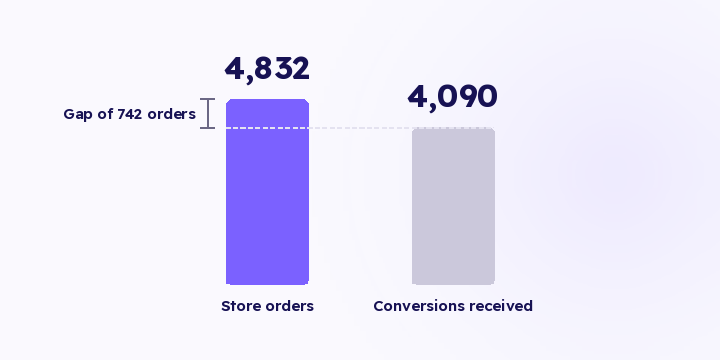
The numbers drifted down, and drift read as a slow week. Four weeks later somebody noticed that store orders and platform conversions no longer resembled each other.
That 111,300 SAR isn't revenue lost from the store. It's revenue lost from the learning. The platform optimises on half the picture and stops showing your ads to the people who were buying. The gap never appears in the ads dashboard, because the platform only knows what reached it.
The comparison that catches this sits between two numbers that should move together: orders recorded in your store, and conversions received by each destination. Run it weekly in a normal month and daily in season, because the cost of a break scales with daily spend.
These are the failure shapes that comparison, or the checks alongside it, will catch:
Note that the second number is conversions the destination received, not the conversions the ads dashboard displays. The dashboard shows what survived the attribution window and the attribution model, so it can fall for reasons that have nothing to do with tracking. The count of events a destination accepted is a raw number you can put straight against your order count.
In Flowfy, credential validation on save is live, along with the live events screen and the delivered-events log that shows each platform's response to each event. The hourly detectors that would run the comparison for you haven't shipped. Until they do, the weekly check above catches most cases, and it's a repeating manual step with everything that implies.
Give the check a named owner and a fixed time. A check assigned to "the team" gets done by nobody, and a check with no fixed hour slides from day to day until it's forgotten.
"Alert me if events drop below 100 a day" fits exactly one store, for about a month.
A store doing 40 orders a day and a store doing 4,000 have nothing in common, and neither does the same store in Ramadan and in the second week of February. A fixed threshold either misses real breaks at the large store or fires constantly at the small one.
So keep the threshold relative to the store's own recent pattern, and know the shape of its natural quiet period. A store that sells nothing between 2am and 6am shouldn't alert every night at three.
An alert with no financial consequence attached doesn't get opened. An alert with 111,300 SAR in it does.
So multiply the missing orders by average order value and put the result in the body of the notification. That step alone separates a system people read from a system people mute, and once notifications get muted every check behind them stops.
The same principle applies to your weekly report. Instead of "15.4% gap", write "742 orders never reached the platforms, which is 111,300 SAR of signal". The first number needs someone to translate it; the second gets acted on.
What breaks tracking most often? Theme and checkout template changes, then expired credentials. Both are routine work that nobody files under measurement.
Will I know which destination broke, or only that something did? The delivered log is per destination and per event, so a failure is attributed to the destination that rejected it, along with the reason it gave.
Does a gap always mean something is broken? No. Some of the gap is natural: blocking browsers, excluded bots, events outside the attribution window. What matters is a change in the gap rather than its existence.
Pull the last two weeks of orders from your store and put the conversions each destination received for the same period next to them. If the gap has changed against the two weeks before, start from the most recent change to the theme or the checkout page.
Tracking doesn't fail in unlimited ways. It fails in about six, and each one has a fingerprint. Here are the six, and the check to run if you only have time for one.
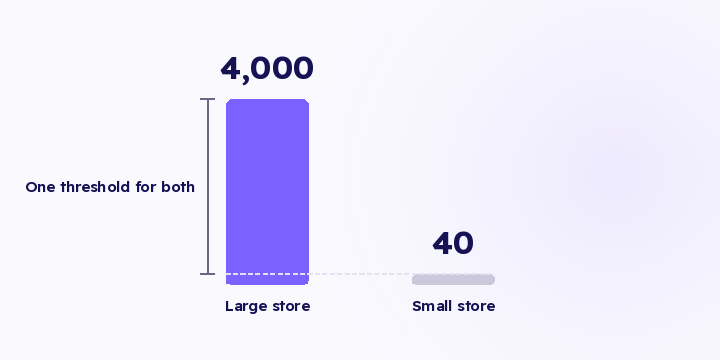
Alert me if events drop below 100 a day is a rule that works for one store, for about a month. A threshold that doesn't know your normal fires when you're fine and stays quiet when you're not.
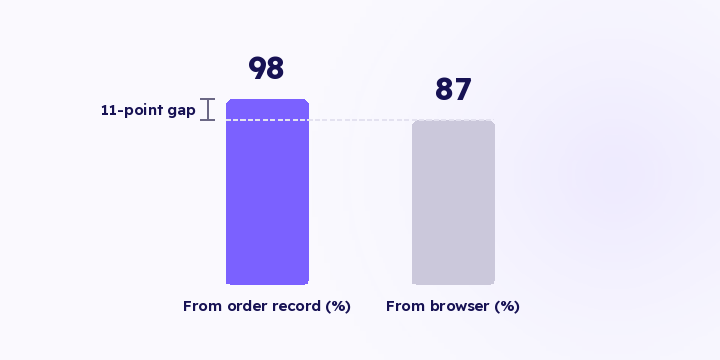
The score a platform gives you counts how many identifiers arrived with the event. Here's what it actually counts, three common objections to it, and what genuinely raises it.