

Seasons
What to freeze before a season, and what to keep changing
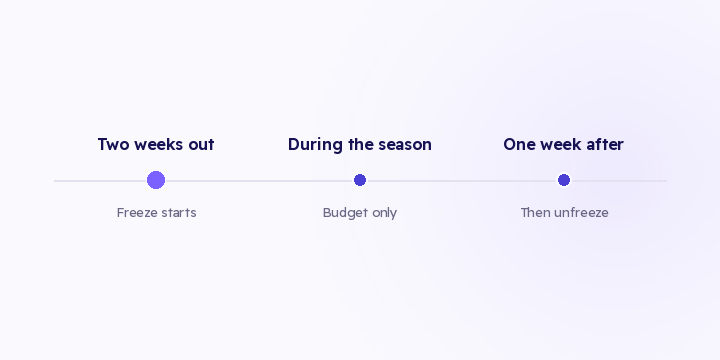
Most season damage comes from a change made during the season itself. Here are the parts you stop touching two weeks out, and the parts you keep adjusting every day.
3 min read
Ramadan doesn't just change how much people buy. It changes when.
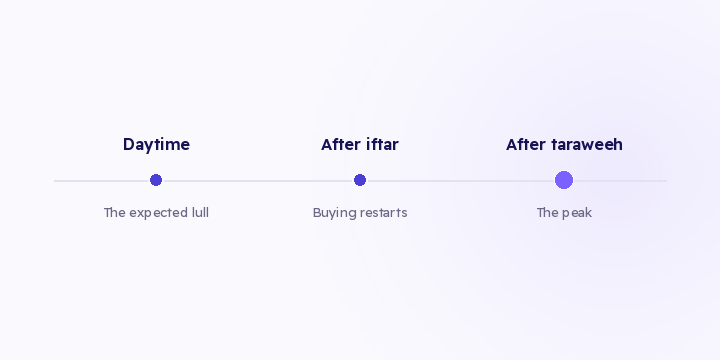
Buying concentrates after iftar and again after taraweeh, running late into the night, while the daytime hours that normally carry your volume go quiet. All of that is predictable. What isn't predictable is that your morning report, your alerts and your daily budget cap are still tuned to a different month.
Sessions cross midnight. A visit that starts at 11pm and converts at 1am splits across two reporting days. In an ordinary month that's rare enough to ignore. In Ramadan it's routine, and it cuts one journey into two buckets.
The daytime lull isn't a decline. Daytime traffic falls sharply. Read as a normal week, that looks like a problem. Read against the season, it's the expected shape.
The morning report. A summary generated at 8am describes a day that has barely started, and it drops the previous night's peak if your day boundary sits at midnight. During Ramadan one evening report is worth several morning ones.
Quiet-period rules. Any rule saying that no orders for N hours means something is broken will fire during the daytime lull and stay silent during a real overnight failure. Exactly inverted. More in why fixed thresholds fail.
Today against yesterday. With volume concentrated into a few night hours, that comparison is really two partial nights set against each other.
Budget pacing. A daily budget that runs out before the evening peak is the most expensive version of this mistake, and the most common. Spend that finishes by 6pm finished before the season started that day.
Change the hour you look: evening, once the peak has formed. Change your comparison unit: season day against season day, not date against date. And change budget pacing so the money is available when the audience is.
Don't touch your tracking configuration. Mid-season changes are the leading cause of mid-season failures, and there's a list of what to freeze in pre-season preparation. Don't switch attribution models either, because the season stops being comparable to any other period.
Cumulative pace against target. Daily figures are noisy under a shifted rhythm. A running total isn't.
If your target is 500 orders and you're at 320 after twenty days, you need 18 a day against a current average of 16. Two orders a day is easy to close on day twenty and out of reach on day twenty-nine, and you can read it whatever hour the orders arrived.
In Flowfy, revenue by source, attribution trends and conversions delivered per destination are live today and read at whatever hour you open them. Goal pace tracking and alerts you configure yourself haven't shipped, and they're on the roadmap (goals with a daily pace). Until they do, the cumulative-against-target calculation is two lines in a spreadsheet.
Open your reports in the evening rather than the morning, and compare season day to season day instead of date to date. If your daily budget runs out before sunset, fix the pacing before anything else.
Most season damage comes from a change made during the season itself. Here are the parts you stop touching two weeks out, and the parts you keep adjusting every day.
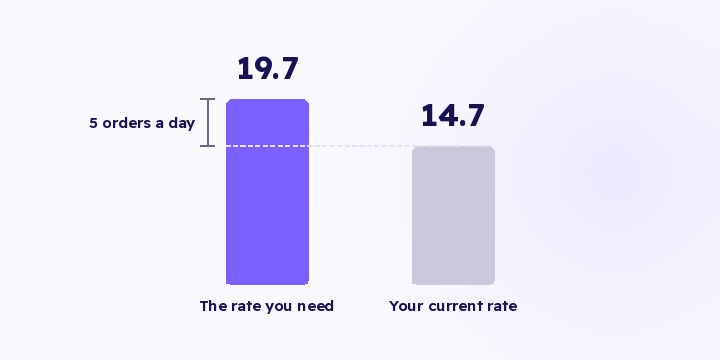
On day 18 you're 264 orders into a target of 500. That figure does nothing for you until it becomes a required daily rate, and the gap between your rate and the required one is your plan for the next fortnight.
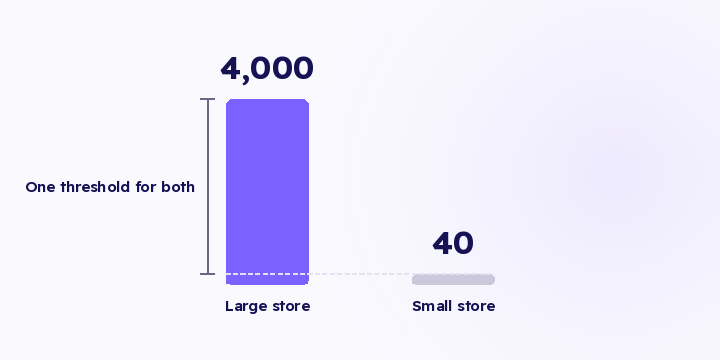
Alert me if events drop below 100 a day is a rule that works for one store, for about a month. A threshold that doesn't know your normal fires when you're fine and stays quiet when you're not.