


Tracking
Six ways tracking breaks, and how to check each one
Tracking doesn't fail in unlimited ways. It fails in about six, and each one has a fingerprint. Here are the six, and the check to run if you only have time for one.
3 min read
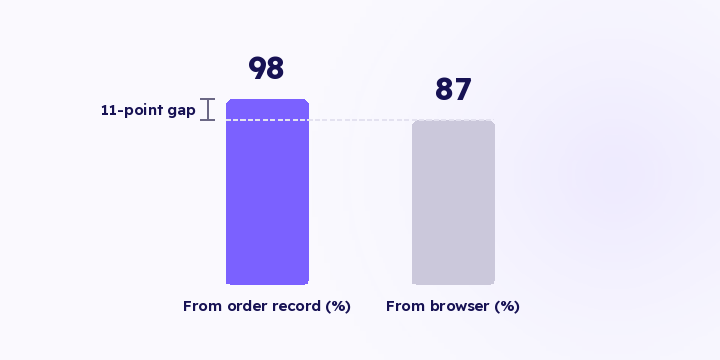
Every ad platform scores your events on how much matching information arrived with them. Meta calls it EMQ, and other platforms have their own names for the same idea.
Most people read the score as a verdict on whether their setup is correct. It doesn't measure that. It counts how many identifiers came with the event, and nothing else.
A single purchase event can carry roughly eight identifying fields, all hashed before they leave your store:
| Identifier | Where it comes from |
|---|---|
| The order record | |
| Phone | The order record |
| External ID | Your store's customer ID |
| Click ID | The link at visit time |
| IP address | The request |
| User agent | The request |
| Name | The order record |
| City and country | The shipping address |
So a score of 5.2 out of 10 means roughly half of those arrived. Nothing is broken in your setup. The event just travelled light.
The hashing is a requirement of the APIs themselves rather than an option you tick, so email and phone don't leave your store in their original form.
An event the platform can't tie to a person is an event it can't learn from. It still counts in your conversion total, but it contributes nothing to who sees your ad next.
That's the part people miss. Match quality isn't a reporting metric, it's an input to targeting. A campaign delivering conversions the platform can't match will keep spending while its targeting stops improving, and the reported return won't warn you, because the conversions are being counted normally.
"A higher score raises my conversions." It doesn't raise the count. It raises how many of them the platform can attribute and learn from. The number of events you send stays the same; what changes is their share of the optimisation.
"There's a target number I should hit." There's no general target worth putting in your report, because your ceiling is set by your checkout. A store that collects phone numbers and opens customer accounts can reach the high nineties. A store with guest checkout and email only can't, however well configured it is. Compare against your own trend, and against the spread between your destinations: a destination scoring far below the rest points to a connection problem there rather than to your data.
"Sending more events raises the score." Volume isn't in the calculation. Neither is send speed or event naming. The score responds to identifiers only.
If your score drops for a week or two without any setup change, the usual cause is a shift in traffic mix: a higher share of guest checkout, or visitors arriving with no click ID. Check the mix before assuming something broke.
In Flowfy, hashed matching information is sent from the order record to every destination, which is what produces the hybrid-path score. Per-event delivery and each platform's response show up in the delivered events log. An aggregated score per destination, tracked over time on one screen, is on the roadmap and hasn't shipped, so today you read the score in each platform's event manager.
Don't optimise for the score. Optimise for sending real identifiers. Start with one change: move the purchase event from the browser to the order record, then check the score again after two weeks.
Tracking doesn't fail in unlimited ways. It fails in about six, and each one has a fingerprint. Here are the six, and the check to run if you only have time for one.
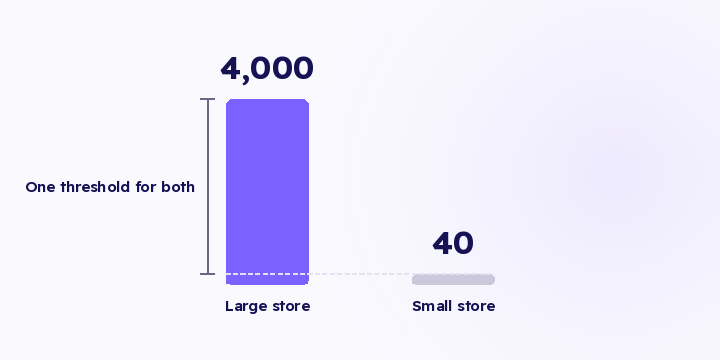
Alert me if events drop below 100 a day is a rule that works for one store, for about a month. A threshold that doesn't know your normal fires when you're fine and stays quiet when you're not.
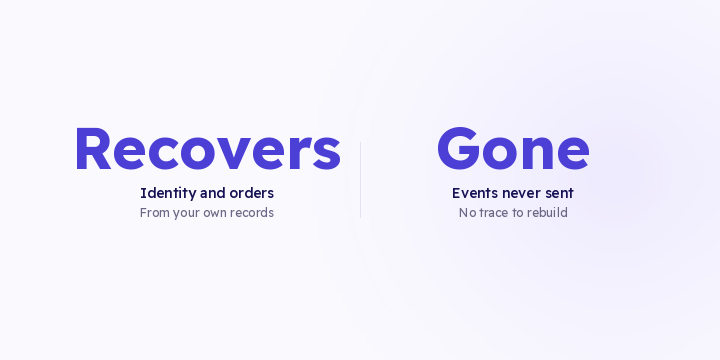
After you fix a tracking gap, part of the past can be rebuilt from records you already own. Part of it is gone. Here's the difference, so you don't spend weeks on the part that doesn't come back.