The browser decides whether the event leaves, not your configuration. Here are three fixes most stores try first, and why none of them changes the outcome.
The moment you find a tracking gap, you reach for the same three fixes: a longer cookie, a renamed script, a different tag manager.
All of them are configuration changes to the browser path, and the browser path is the thing that's failing. You don't control the browser. You send it a request and it decides. Here's what actually happens under each of the three objections.
You don't set the lifetime. Safari's Intelligent Tracking Prevention caps first-party cookie lifetime regardless of what your server asks for, and the header you send is something the browser can ignore.
What this looks like in your report: a visitor returning after that window counts as a new visitor with no source. So if you raise the cookie lifetime in your settings and your new-visitor share doesn't move, nothing is broken. That's the ceiling.
Blocklists match endpoints and request patterns, not filenames alone. A script you renamed and put on your own domain still calls the same destination, and that call is what gets blocked.
You can test it in a minute: turn on an ad blocker in your own browser, open a product page, and check whether the event reached your live events log. If it didn't arrive after the rename, the problem is the destination rather than the file.
A tag manager decides when a script runs. It has no bearing on whether the browser permits the request that script makes.
Firing the event earlier helps with one narrow case, a visitor closing the page before the script executes. It does nothing for the rest, and it raises the risk of counting an order that never settled.
None of the three is a bad idea. They just don't change the outcome. The decision sits with the browser rather than with your configuration.
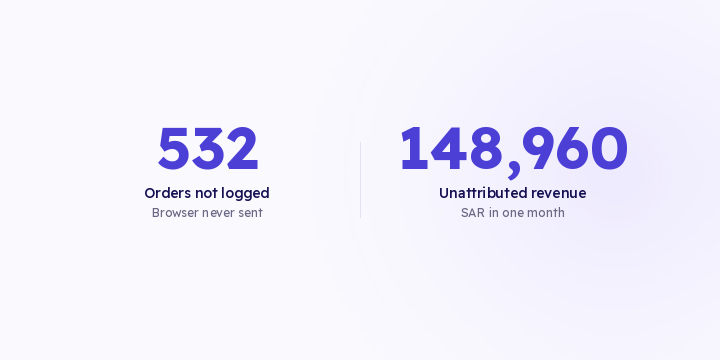
The 532 missing orders in the figures above aren't phantom orders. They happened, and the customer was charged. The event simply didn't leave the browser.
The last column is the important one. Three of the four causes are entirely out of your hands, which means time spent on pixel settings is time spent on the small part of the problem.
An order that reaches your store's backend can be forwarded onward without the shopper's browser taking part. Salla and Zid both emit the order to your server by webhook, and that message can't be blocked by a browser extension and doesn't expire.
That's why server-side delivery keeps being recommended for something that sounds like a tagging problem. It isn't a better tag, it's a different route, and none of the four causes above can reach it.
The browser path still has a job. The browser is the only place the click identifier exists, and the click identifier is what lets you match orders to spend on the platform's own key rather than a UTM string. Remove the pixel to stop double counting and you lose the click identifier while the duplication stays where it is. What fixes it is a shared event ID.
In Flowfy, server-side delivery from Salla and Zid is live today alongside the browser path and reconciled on a shared event ID, and bot and non-human session classification is live as well.
Measure your own gap once: compare a full month of store orders against the events your browser tracking recorded. The difference is your gap, and it's usually larger than people expect.
The size of it varies by store. It grows with your iOS share and with how technical your audience is. Stores selling to a younger, iPhone-heavy audience lose more. Your own number matters more than any general figure you read.
Then switch on the server path instead of re-tuning the pixel. Orders already lost don't come back, because an event that was never sent can't be reconstructed, so the whole fix is forward-looking.
One last point that often gets mixed up: a consent banner changes what you're permitted to collect, which is a separate question from what the browser lets through. Server-side delivery doesn't exempt you from consent obligations and shouldn't be used for that.
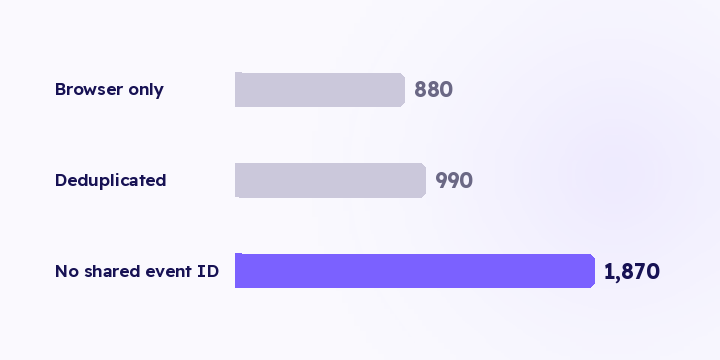
The browser pixel and server-side tracking complete each other. Without a shared event ID between them, the same order is counted twice and ROAS reads better than reality. Here's what each path sees, and where deduplication breaks.
Tracking doesn't fail in unlimited ways. It fails in about six, and each one has a fingerprint. Here are the six, and the check to run if you only have time for one.
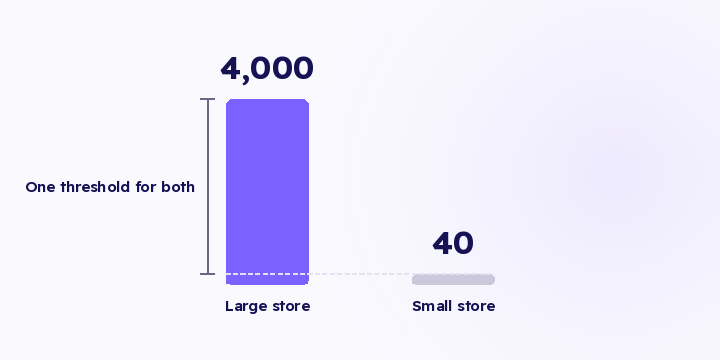
Alert me if events drop below 100 a day is a rule that works for one store, for about a month. A threshold that doesn't know your normal fires when you're fine and stays quiet when you're not.